
Filed under: Tutorials · YouTube Tests & Guides
Correction and update, October 6, 2026. YouTube’s Shorts feed limit is a time-management control. It is not an algorithm setting that promises to show fewer Shorts everywhere. Our earlier Android demonstration noticed fewer Shorts after a change and restart, but that observation did not establish why the feed changed.
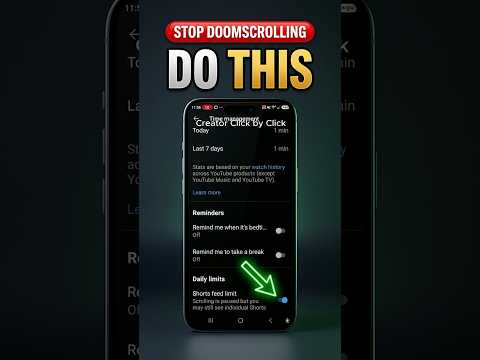
Set the limit using the documented controls
- Sign in to the YouTube app.
- Open the You tab, then Settings.
- Choose Time management → Shorts feed limit.
- Select a time limit; the documented choices include zero.
According to YouTube’s current help page, reaching the limit displays a reminder, with an option to dismiss or ignore it. That makes the ordinary limit a reminder you can override, not an irreversible block. Restarting the app is not listed as a required setup step in that guide.
What to expect
The limit concerns time in the Shorts feed. Do not interpret it as removing every Short from search results, channel pages or the rest of YouTube. The benefit is a deliberate stopping point while scrolling.
Before relying on it, choose a small limit and observe the reminder in your own account. This is a suggested verification check, not a new test we performed for this article. App versions, account controls and supervised-account settings can differ.
If the setting is not visible
Check that you are signed in and using the current YouTube app. Compare the path with the official help page and note your app version. Do not install an unofficial “YouTube blocker” simply because a menu differs from a screenshot.
Make the reminder useful
Decide what you will do when it appears: close the feed, return to a specific task or switch to a planned video. If you repeatedly dismiss the reminder, the setting cannot make that decision for you. Choose the duration based on your own goal rather than a promised effect on recommendations.
Corrected verdict: a useful Shorts time reminder, with an ordinary dismiss option. Our original feed observation does not prove reduced recommendations or complete Shorts removal.
Prefer to watch the demonstration?
The written article above contains the essential answer. The public video is available as an optional walkthrough.