

Microsoft announced a rebuilt Windows 11 Photos app on October 15, 2026, including a wider rollout of Relight. The feature lets you change the lighting in an existing photo—a useful possibility when the shot is good but the light was not cooperating.
The catch is access. The new Photos experience is rolling out first to Windows Insiders, with broader Windows 11 availability planned for later in 2026. An updated Store listing does not mean your PC has received the new editor yet.
What Microsoft announced
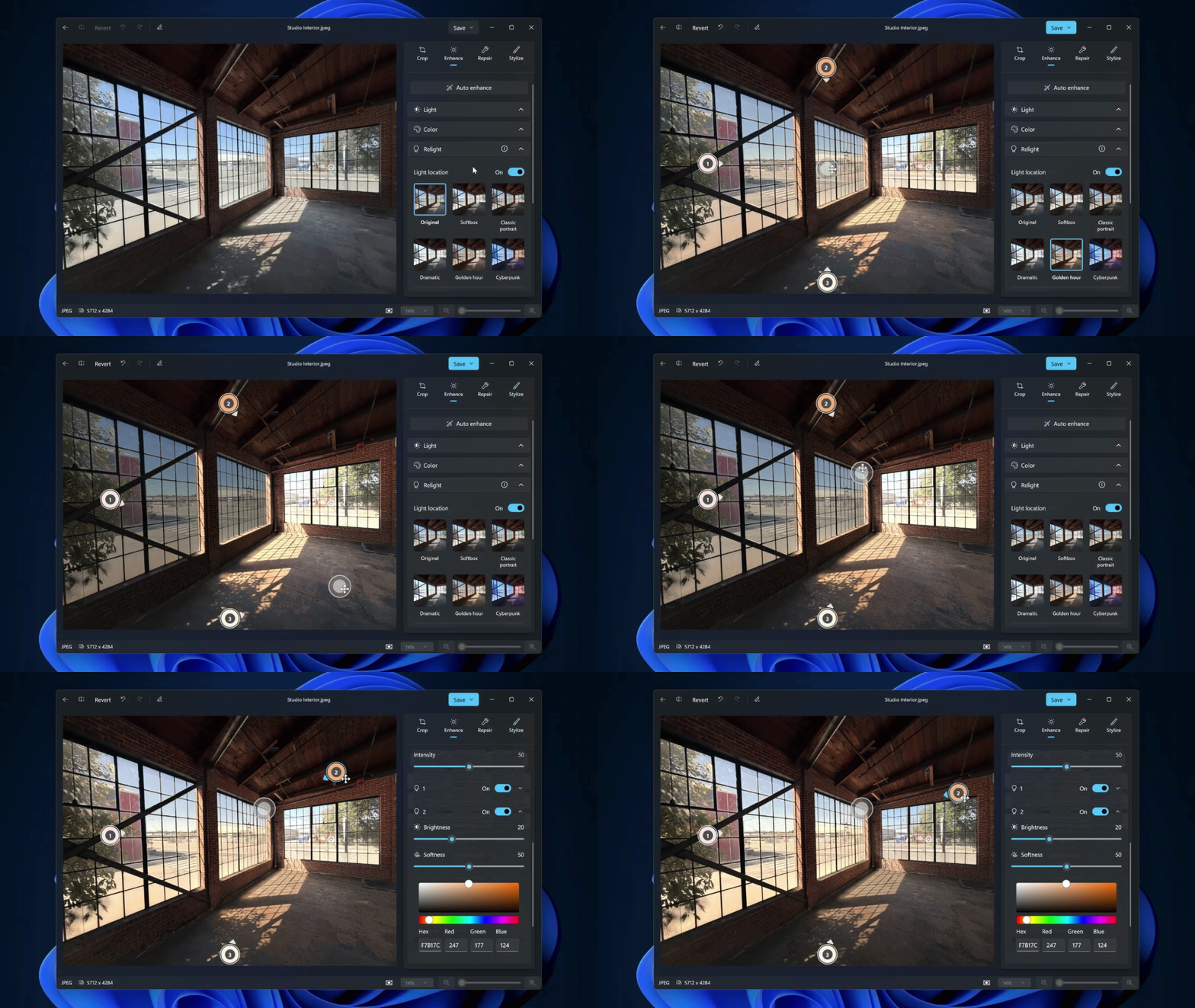
According to Microsoft’s October 15 announcement, Relight is expanding to all Windows 11 devices. Users can position up to three virtual lights, change their colors, adjust the effect, and try presets such as golden hour. The rebuilt app also introduces a reorganized editor, improved object removal, and a redesigned gallery and viewer. Those descriptions are Microsoft’s claims; we have not tested the new build.
How to get early access
The official preview route is the Windows Insider Program. We have not verified a separate Photos-only beta download for this release.
- Open Settings → Windows Update → Windows Insider Program.
- Select Get started → Link an account and use the Microsoft account registered with the Insider program.
- Choose an offered Insider channel, review the agreements, and follow the restart instructions.
- After Windows finishes updating, check Microsoft Store for a Microsoft Photos update, then open a photo and look for Relight in the new editor.
Enrollment is not a guarantee. Microsoft’s Photos announcement does not identify a required Insider channel or promise immediate access for every enrolled device. The update is arriving gradually. We cannot confirm that selecting the Beta channel alone will unlock it.
Insider enrollment affects Windows itself, not just Photos. Microsoft describes preview builds as less stable than production builds. Our advice is to use a spare PC if you want to explore previews; back up important files first. For a main work computer, waiting for the wider rollout is the simpler choice.
What is available right now?
There is still a documentation mismatch: the Relight support page describes Copilot+ PC requirements, while the newer announcement says access is expanding to all Windows 11 devices. Treat that expansion as a rollout in progress, rather than proof that Relight is already available on your machine.
In screenshots supplied to The Click Test, one Windows 11 installation still showed the older Light adjustments, without Relight, and its Microsoft Store product page offered Open rather than Update. That is a reader-supplied access observation, not an independent test of the new app or evidence about every PC.
Microsoft’s announcement does not list a separate Relight subscription fee. We have not independently verified the final build’s account requirements, download size, or device-specific availability. Microsoft’s Photos guide explains that local photos can be browsed without signing into OneDrive.
The Click Test status: This is release news, not a hands-on lesson. We have not tested the expanded Relight release or produced a before-and-after sample with it.